

Deposit Without the App
You don’t need the 3F app to enter a position. Every step is a plain contract call, so you can make it from Etherscan, from any wallet that accepts raw calldata (Safe, Fireblocks, Fordefi, …), or from the command line with Foundry’s cast. Under the hood this is the deposit flow: you deposit USDC into a Facility intent, receive ERC-6909 LP tokens 1:1, and once the intent is resolved you burn them to claim your Position Manager shares.
The whole process takes four transactions spread over the life of the intent:
approve— let the Facility pull your USDCdeposit— send USDC into the intent- (wait for the intent to resolve)
claim— burn your LP tokens and receive the Position Manager shares
To exit a position the same way, see Redeem Without the App.
Before You Start
Section titled “Before You Start”You need:
- A wallet that can sign transactions on Ethereum mainnet, holding the USDC you want to deposit and some ETH for gas.
- An allowed address. LP tokens and Position Manager shares are governed by the Position Manager’s TransferGuard. Your address must be onboarded with 3F, otherwise
depositreverts withTransferBlocked. - An intent ID confirmed by the 3F team — see step 1.
| Contract | Address |
|---|---|
| Facility | 0x4e013ca8fF612a58F53C822904cDD0eC538a4A4F |
| USDC | 0xA0b86991c6218b36c1d19D4a2e9Eb0cE3606eB48 |
| Position Managers | One per asset and leverage tier — see Deployments |
How to Send the Calls
Section titled “How to Send the Calls”Each step below shows its call in three formats. Pick one tab and every call on the page — and on the redemption guide — switches with it.
- Etherscan — no tooling needed. The Facility is a proxy, so its functions live under Contract → Read as Proxy and Contract → Write as Proxy. Click Connect Wallet before calling a write function; the links open the right function directly.
- Calldata — the raw
toanddataof each call, for wallets that take them directly: a custom transaction in Safe’s Transaction Builder, a contract call in Fireblocks or Fordefi, or your own scripts. Writes send 0 ETH; reads areeth_calls. - cast — commands for Foundry’s
cast. SetETH_RPC_URLto a mainnet RPC first. Write commands use--interactive, which prompts for a private key; replace it with--account <name>for a Foundry keystore, or--ledger/--trezorfor a hardware wallet.
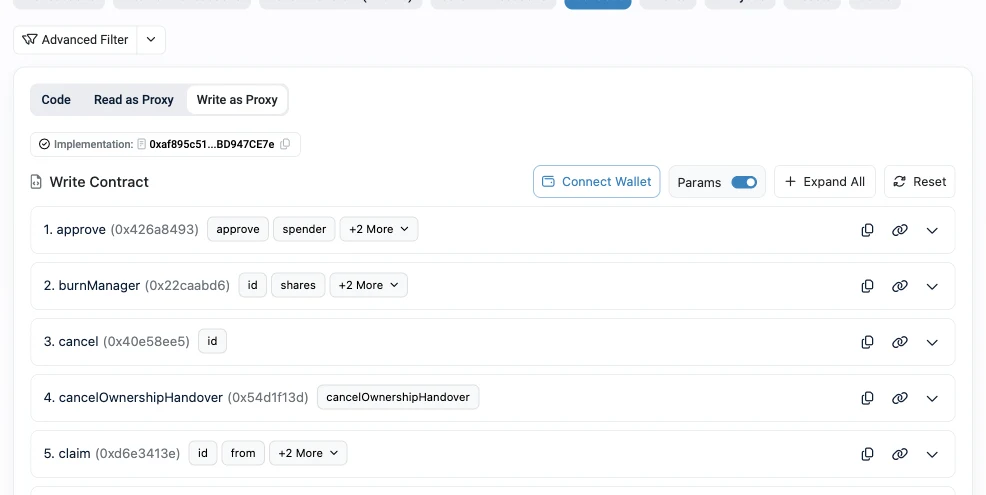
Fill In Your Values
Section titled “Fill In Your Values”Enter your values once and every call below is filled in for you, in all three formats.
Every call on this page updates as you type. Nothing you enter leaves your browser.
1. Find an Open Intent
Section titled “1. Find an Open Intent”Deposits go into a specific intent, identified by a numeric ID. The 3F team creates deposit intents for each Position Manager. Several are often open at once (including in-kind intents that take the wrapped asset instead of USDC), so you need the ID of the one meant for you.
There are two ways to find it:
- Ask the 3F team for the intent ID to use.
- Use the 3F LP API.
GET https://lp.3f.xyz/v1/intents/{asset}?state=createdlists the intents that are still open for an asset. Keep the items with"type": "deposit"; the intent ID isonChainId. Add&vault=<position manager address>to narrow the list to one leverage tier. The full API reference is at lp.3f.xyz/docs.
| Asset | {asset} slug |
|---|---|
| Bitwise USCC | superstate-uscc |
| Janus Henderson JAAA | centrifuge-jaaa |
| Midas mGLO | midas-mglo |
| FalconX | pareto-falconx |
You can also index IntentCreated events on the Facility yourself.
2. Verify the Intent
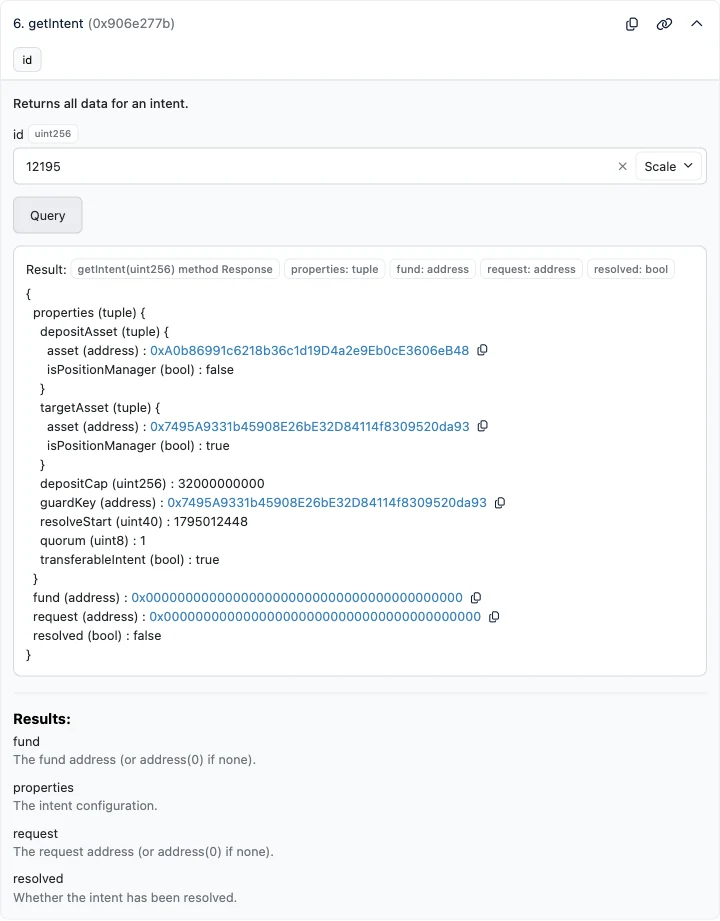
Section titled “2. Verify the Intent”Read the intent’s configuration with getIntent:
Open getIntent (#6) on the Facility's Read as Proxy tab, fill in the fields below and click Query.
| id (uint256) | <intent-id> |
|---|
| To | 0x4e013ca8fF612a58F53C822904cDD0eC538a4A4F |
|---|---|
| Data | Fill in the intent ID above |
Read-only: send it as an eth_call, nothing is signed.
cast call 0x4e013ca8fF612a58F53C822904cDD0eC538a4A4F \
  "getIntent(uint256)(((address,bool),(address,bool),uint256,address,uint40,uint8,bool),address,address,bool)" <intent-id> \
  --rpc-url "$ETH_RPC_URL"
cast prints the same fields as a tuple — the intent’s properties, then fund, request and resolved:
((0xA0b86991c6218b36c1d19D4a2e9Eb0cE3606eB48, false), (0x7495A9331b45908E26bE32D84114f8309520da93, true), 32000000000 [3.2e10], 0x7495A9331b45908E26bE32D84114f8309520da93, 1795012448 [1.795e9], 1, true)0x00000000000000000000000000000000000000000x0000000000000000000000000000000000000000falseThe properties tuple is, in order: (depositAsset.asset, depositAsset.isPositionManager), (targetAsset.asset, targetAsset.isPositionManager), depositCap, guardKey, resolveStart, quorum, transferableIntent.
Check every field against the table below. If anything does not match, do not deposit — contact the 3F team.
| Field | Expected for a deposit intent |
|---|---|
depositAsset.asset |
USDC — 0xA0b86991c6218b36c1d19D4a2e9Eb0cE3606eB48 (the Position Manager’s debt asset) |
depositAsset.isPositionManager |
false |
targetAsset.asset |
The Position Manager you want to enter. Cross-check the address on Deployments |
targetAsset.isPositionManager |
true |
depositCap |
Leaves room for your deposit — see the cap check below |
guardKey |
The same address as targetAsset.asset |
resolveStart |
In the future, with a comfortable margin. It is a Unix timestamp in seconds — deposits close at this time |
quorum |
At least 1 — the number of guardian signatures required before the facilitator can bind a Fund or Request to the intent or swap its balances |
transferableIntent |
Informational — whether your LP tokens can be transferred to another address |
resolved |
false |
In the example above, intent 12195 takes USDC and targets FALCONX-5X (0x7495…da93), accepts up to 32,000 USDC (32000000000), closes deposits at 1795012448 (2026-11-18 14:34 UTC), requires one guardian signature and is not resolved — a valid deposit intent at the time of the screenshot.
Check the Remaining Cap
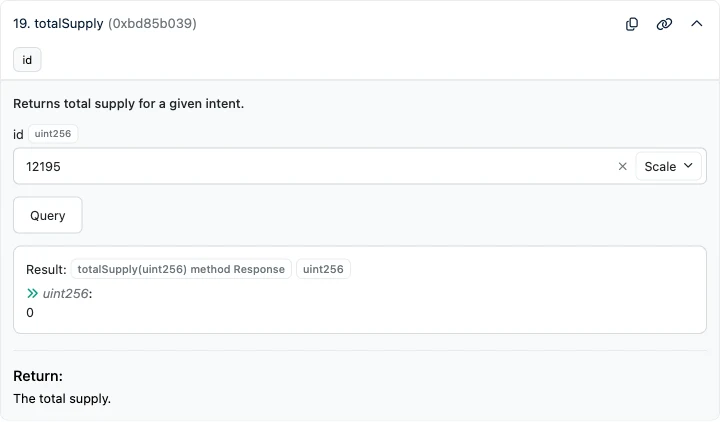
Section titled “Check the Remaining Cap”A deposit reverts if it would push the intent’s total deposits above depositCap. totalSupply returns the amount already deposited:
Open totalSupply (#19) on the Facility's Read as Proxy tab, fill in the fields below and click Query.
| id (uint256) | <intent-id> |
|---|
| To | 0x4e013ca8fF612a58F53C822904cDD0eC538a4A4F |
|---|---|
| Data | Fill in the intent ID above |
Read-only: send it as an eth_call, nothing is signed.
cast call 0x4e013ca8fF612a58F53C822904cDD0eC538a4A4F \
  "totalSupply(uint256)(uint256)" <intent-id> \
  --rpc-url "$ETH_RPC_URL"
The most you can deposit is depositCap − totalSupply, both in USDC’s 6-decimal units. In the example: 32000000000 − 0, so up to 32,000 USDC.
3. Approve USDC
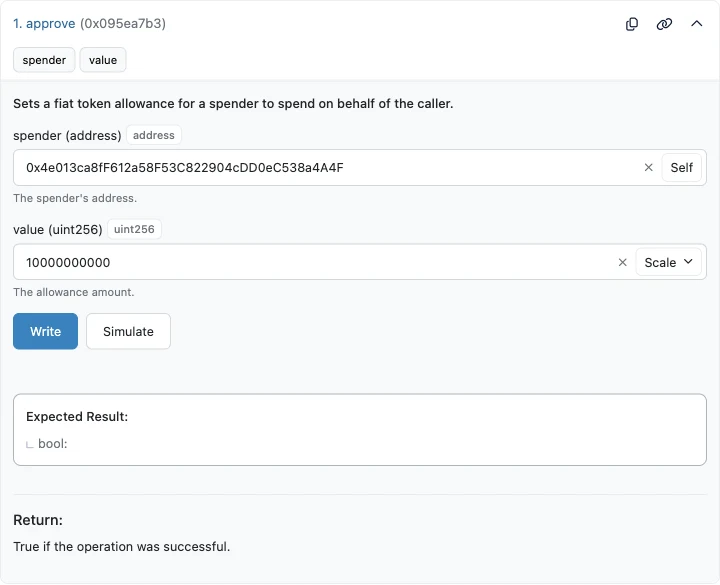
Section titled “3. Approve USDC”Allow the Facility to pull your deposit by calling approve on USDC, with the Facility as spender and your deposit amount as value:
Open approve (#1) on the USDC's Write as Proxy tab, fill in the fields below and click Write.
| spender (address) | 0x4e013ca8fF612a58F53C822904cDD0eC538a4A4F |
|---|---|
| value (uint256) | <amount> |
| To | 0xA0b86991c6218b36c1d19D4a2e9Eb0cE3606eB48 |
|---|---|
| Value | 0 |
| Data | Fill in the amount above |
Send from your address with 0 ETH — e.g. as a custom transaction in Safe's Transaction Builder, or a contract call in Fireblocks or Fordefi.
cast send 0xA0b86991c6218b36c1d19D4a2e9Eb0cE3606eB48 \
  "approve(address,uint256)" \
  0x4e013ca8fF612a58F53C822904cDD0eC538a4A4F <amount> \
  --rpc-url "$ETH_RPC_URL" --interactive
Approving the exact amount, rather than an unlimited allowance, keeps the Facility from being able to pull more USDC than you intend.
4. Deposit
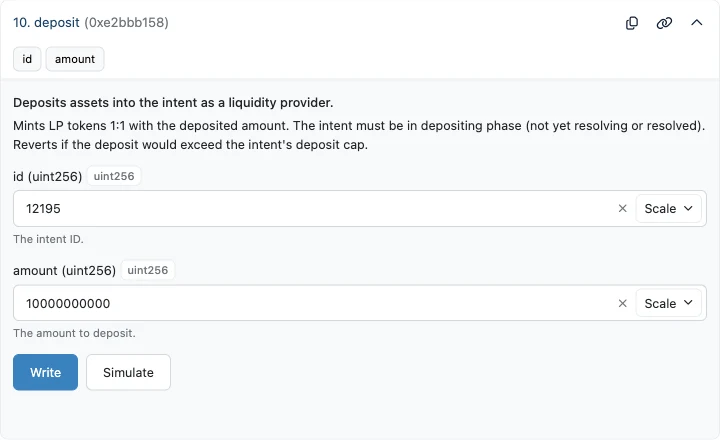
Section titled “4. Deposit”Call deposit on the Facility with the intent ID and the amount you approved:
Open deposit (#10) on the Facility's Write as Proxy tab, fill in the fields below and click Write.
| id (uint256) | <intent-id> |
|---|---|
| amount (uint256) | <amount> |
| To | 0x4e013ca8fF612a58F53C822904cDD0eC538a4A4F |
|---|---|
| Value | 0 |
| Data | Fill in the intent ID and the amount above |
Send from your address with 0 ETH — e.g. as a custom transaction in Safe's Transaction Builder, or a contract call in Fireblocks or Fordefi.
cast send 0x4e013ca8fF612a58F53C822904cDD0eC538a4A4F \
  "deposit(uint256,uint256)" \
  <intent-id> <amount> \
  --rpc-url "$ETH_RPC_URL" --interactive
The Facility pulls your USDC and mints you the same amount of LP tokens for that intent. Keep a note of the amount — it is what you claim with later. You can check your LP balance at any time:
Open balanceOf (#2) on the Facility's Read as Proxy tab, fill in the fields below and click Query.
| owner (address) | <your-address> |
|---|---|
| id (uint256) | <intent-id> |
| To | 0x4e013ca8fF612a58F53C822904cDD0eC538a4A4F |
|---|---|
| Data | Fill in your address and the intent ID above |
Read-only: send it as an eth_call, nothing is signed.
cast call 0x4e013ca8fF612a58F53C822904cDD0eC538a4A4F \
  "balanceOf(address,uint256)(uint256)" <your-address> <intent-id> \
--rpc-url "$ETH_RPC_URL"5. Wait for the Intent to Resolve
Section titled “5. Wait for the Intent to Resolve”Deposits close at resolveStart, or earlier if the facilitator locks the intent. The facilitator then executes the strategy: it takes a bridge loan, subscribes to the fund, waits for settlement, opens the leveraged position in the Position Manager and repays the bridge loan (see the deposit flow). Settlement can take from days to weeks depending on the fund.
Until deposits close you can still back out. withdraw burns your LP tokens and returns your USDC 1:1:
Open withdraw (#36) on the Facility's Write as Proxy tab, fill in the fields below and click Write.
| id (uint256) | <intent-id> |
|---|---|
| from (address) | <your-address> |
| receiver (address) | <your-address> |
| amount (uint256) | <amount> |
| To | 0x4e013ca8fF612a58F53C822904cDD0eC538a4A4F |
|---|---|
| Value | 0 |
| Data | Fill in the intent ID, your address and the amount above |
Send from your address with 0 ETH — e.g. as a custom transaction in Safe's Transaction Builder, or a contract call in Fireblocks or Fordefi.
cast send 0x4e013ca8fF612a58F53C822904cDD0eC538a4A4F \
  "withdraw(uint256,address,address,uint256)" \
  <intent-id> <your-address> <your-address> <amount> \
  --rpc-url "$ETH_RPC_URL" --interactive
Once deposits close, your funds stay committed until resolution. To check progress, read getIntent again — the intent is ready to claim when resolved is true.
6. Claim Your Position Manager Shares
Section titled “6. Claim Your Position Manager Shares”Once the intent is resolved, a claim pays out your pro-rata share of everything the intent holds — the Position Manager shares, plus any USDC that was not deployed. To preview what the intent holds:
Open intentBalances (#10) on the Facility's Read as Proxy tab, fill in the fields below and click Query.
| id (uint256) | <intent-id> |
|---|
| To | 0x4e013ca8fF612a58F53C822904cDD0eC538a4A4F |
|---|---|
| Data | Fill in the intent ID above |
Read-only: send it as an eth_call, nothing is signed.
cast call 0x4e013ca8fF612a58F53C822904cDD0eC538a4A4F \
  "intentBalances(uint256)(address[],uint256[])" <intent-id> \
  --rpc-url "$ETH_RPC_URL"
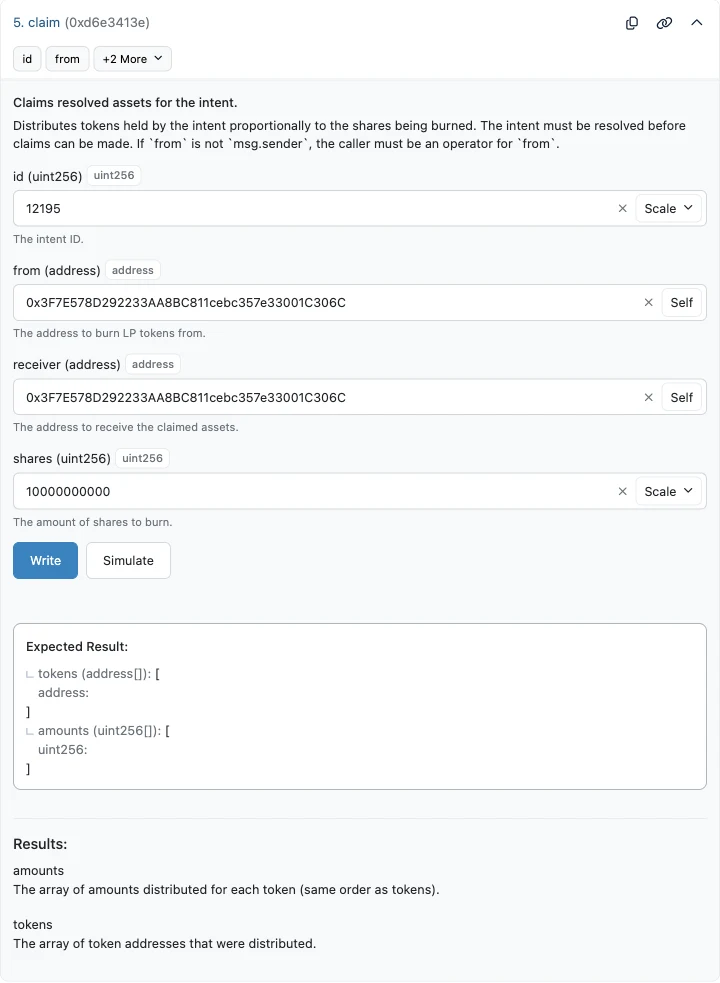
Then call claim with your address as both from (the owner of the LP tokens) and receiver (where the shares are sent), and the number of LP tokens to burn as shares — the total amount you deposited, in the same 6-decimal units:
Open claim (#5) on the Facility's Write as Proxy tab, fill in the fields below and click Write.
| id (uint256) | <intent-id> |
|---|---|
| from (address) | <your-address> |
| receiver (address) | <your-address> |
| shares (uint256) | <amount> |
| To | 0x4e013ca8fF612a58F53C822904cDD0eC538a4A4F |
|---|---|
| Value | 0 |
| Data | Fill in the intent ID, your address and the amount above |
Send from your address with 0 ETH — e.g. as a custom transaction in Safe's Transaction Builder, or a contract call in Fireblocks or Fordefi.
cast send 0x4e013ca8fF612a58F53C822904cDD0eC538a4A4F \
  "claim(uint256,address,address,uint256)" \
  <intent-id> <your-address> <your-address> <amount> \
  --rpc-url "$ETH_RPC_URL" --interactive
The Facility burns your LP tokens and sends you the proceeds. You can also claim in several parts by burning fewer LP tokens each time. The Position Manager shares then appear in your wallet as a regular ERC-20 token (e.g. FALCONX-5X, 18 decimals).